Welp, I’m getting ready to wrap up my 17th year of teaching (and 16th year teaching at the same school!) I am happy to report that this year was 1,000 times better than last year. If you’ve been around the blogcito for a while, you know that, for me, last year was like teaching in a dumpster of burning trash. I am not being dramatic here, I just barely made it out alive. To be perfectly honest with you, I was researching new career options and seriously searching for jobs outside of teaching. My wise friend Elicia Cardenas advised me, “Don’t make any life decisions when you’re in crisis”. Since Elicia is wise and since I was absolutely in crisis mode, I decided I’d give it one more year. I figured that way, if it was just as bad as the previous year, that would be a clear indicator I needed something new, and if the year turned out better, I could just chalk up 2021-2022 to a rough year.
Turns out 2021-2022 was an awful year and 2022-2023 was a breath of fresh air! I feel like a good teacher again, I had a blast with my Little Darlings and colleagues and I’m so thankful I didn’t resign! Praise Jesus!
Even though we’ve got 2 weeks left of school, my head is swimming with improvements for next year, and in case it might be useful to someone out there, I’ll sort though the zillion post-its and pages of notes and try to organize them here. And isn’t that the best part of teaching? We get to keep starting over! Just because one year is a disaster, doesn’t mean that every year will be like that. My favorite part of teaching is we get a blank slate and and the opportunity to try again, every fall.
This post will be regarding my general Spanish classes and classroom policies. I have a bunch of thoughts specific to AP Spanish, so I’ll save that for another post, stay tuned if you’re an AP teacher!
What worked:
Cell Phone Policy: Cell phones in the classroom are the bane of our existence, right? I started every single class with a slide and reminder to put phones and ear buds in their backpacks. Not in their pockets. Not under their thighs or stored in their bras. Zipped away in their backpacks. In the days of yore, I was so annoyed that I had to keep reminding them to put them away and this year I decided to be proactive: remind them once at the start of every class. What a difference it has made!
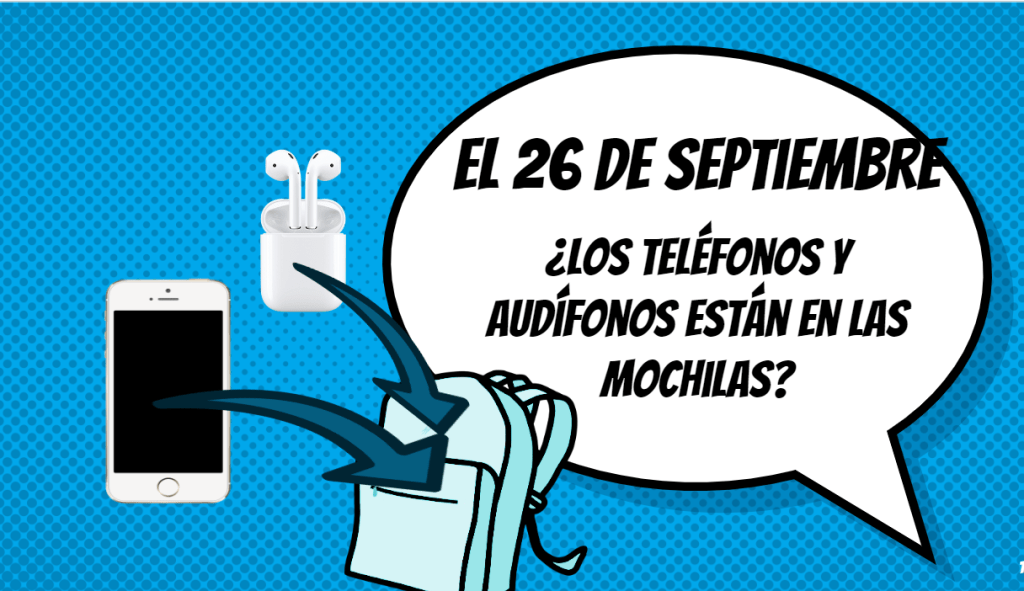
At my school, we’re allowed to send phones to the office at teacher’s discretion if they’re a problem during class, then administration calls parents who must come and retrieve their child’s phone. I am thankful for the support, but my portable is in a land far far away from the office so it’s kind of a big pain to deliver the phones between classes. Thus the Phone Probation List:

If a student sneakily (or obviously) uses their phone or earbuds during class, I ask them to charge their phone, on my desk. Then after class, I check my Phone Probation List (to confirm that this is a first time offender), I remind them of the policy (in their backpacks during class!) and that if they want to sign my Phone Probation list, they can have their device back. By signing the list, they acknowledged the policy and understand that the next time, their phone or earbuds will be sent to the office. I keep the Probation List on a clipboard hanging right next to my charging station. Under the Probation Lsit I’ve got a bunch of referral sheets already filled out, should I need to send a phone to the office.
“____________ was using their phone during class on__________. Previously, on ___________, I reminded this student of the phone policy and they acknowledged their understanding that the next time their phone was in use in class, it would be sent to the office”.
This works for me because it’s proactive (reminder at the beginning of every class), gives them a documented warning, makes life easier for me, and if we get to the point of sending the phone to the office, it’s no surprise. This has worked extremely well; this year I’ve only sent 4 phones to the office and have 35 names on my Phone Probation List. Win-Win-Win….this is a keeper!
Classroom Numbers: This is one of those silly little things that’s a big timesaver! About the second week of school (once the majority of class schedules are sorted out) I assign everyone a number, and ask them to include their number next to their name on everything they turn in. He’s the secret to making it work: post the classroom numbers in the classroom, so students can check their number, when they forget! Anytime I assign them passwords, like for Textivate, for example, I use the generic formula “first name + last name + class number” to make it easy to help students remember their passwords.
Whenever I collect anything, I say, “pass your papers to so and so” who always happens to be one of those highly motivated and organized types. I ask them to order the papers by number, then put them on my desk. Now everything is alphabetized and easy to enter into the gradebook or put in their portfolios (or let’s be honest, recycle if I can’t deal with it.)
Does the whole plan fall apart when you get a new student who moves from Tennessee in November?! Not to worry, just assign Joey Baker number 2.5, right between Emily Azari (number 2) and Taylor Brooks (number 3). It will be fine.
Portfolios: Speaking of portfolios. They’re a keeper! I’ve got a whole post here about how I set them up and how we revisit them throughout the year. That’s where we keep their Timed Writings and Celebrations of Knowledge (aka Tests!) and where we marvel at their language acquisition. They’re handy for parent conferences and when you need to impress your colleagues or administrators.
Refocus Sheets: My fantastic colleague Julie introduced our department to the Refocus Sheets…for when a Little Darlings is on your last nerve, but you don’t want to send a kid to the office. They’re a great way to give everyone a few minutes to calm down and regroup. Here’s a whole post about the Refocus Sheets. They are just great and they’re sticking around next year!
Make up Mondays: This was the best boundary I set all year! Mondays at lunch are the days Sra. Chase is available to help you, if you need to make up an assignment or retake a test or quiz. I used to be available every lunch and it felt like they were sucking the life out of me. Now I eat lunch with grown-ups. Or revel in the beautiful silence as a savor my lunch and scroll through Facebook. (BTW- wanna be Facebook Friends?) The Little Darlings get one lunch a week to take care of business and it’s glorious. (For Mondays that there’s no school, we pivot to Make Up Miércoles.)
Google Folders: Leave it to the bright folks at Google to make everything better! This year I really flexed the Google Bookmark Bar to make my life easier. Each class has a folder and all the materials I need for TEACHING and PLANNING the current unit for a particular class organized and accessible. So much faster than searching for all the things in my Google Drive!
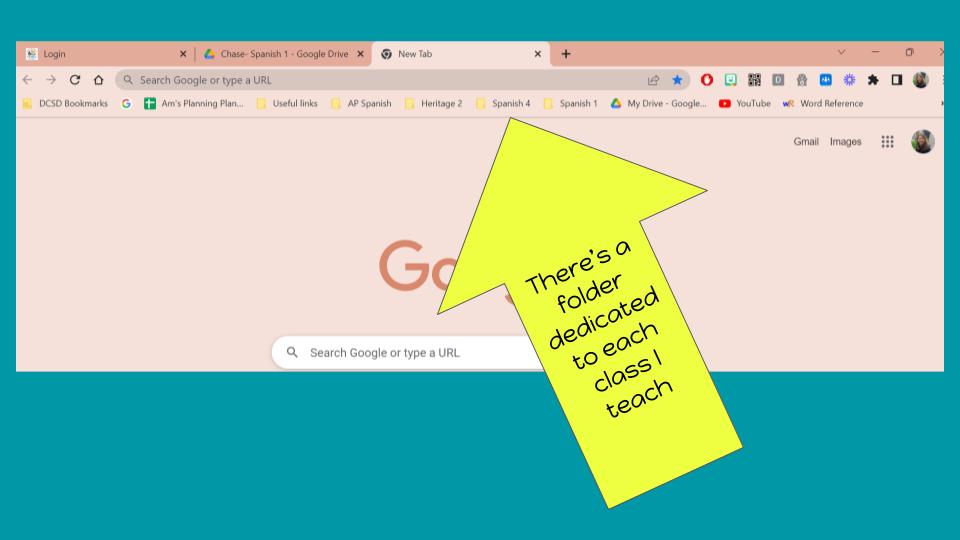
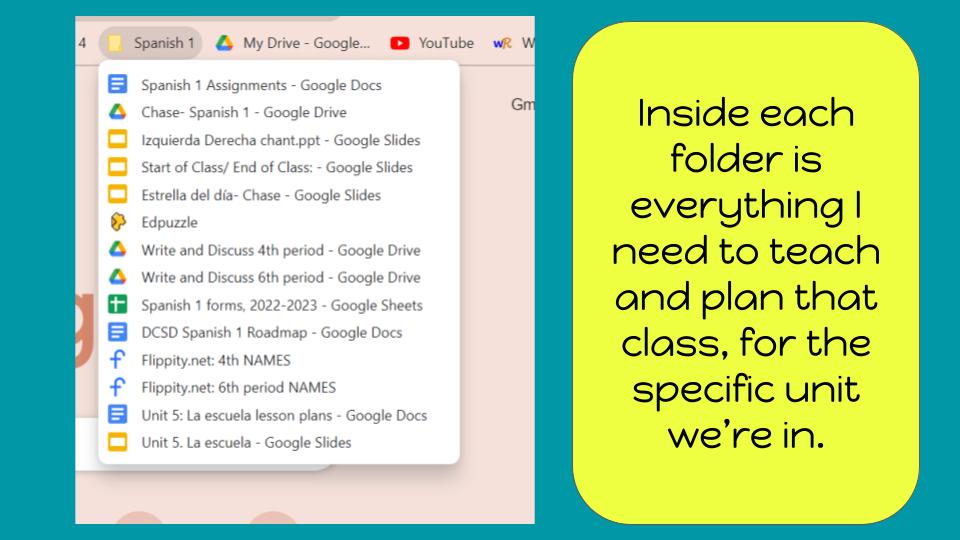
Included in each class’s folder is the Assignment List (another winner that I’ll be implementing again next year!), slideshows and websites I frequently use for that class, Write and Discuss folders, a Google Sheet where I import all their Google Form Interpretive Quick Quizzes and Lighting Fast True/False Quizzes, Flippity’s Random Name Picker with the Little Darlings’ names loaded in (to make pairing students and creating groups quick and easy), and finally the lesson plan and slideshow for whatever I’m currently teaching. And since Google is so dang smart, no matter which device I’m working on, everything is there, ready to go!
What sorta worked but needs a some adjustments:
Bathroom Policy I tried a new bathroom policy this year and I’d give it about a C+. For a million years, I’ve given students a set number of bathroom passes per semester. Last year I decided I was done with the bathroom right decided instead to outline some guidelines of when’s the best time to leave class (during independent work time or while we’re playing a game) and when to wait (when Sra Chase is teaching her little heart out).

This worked pretty well but it caused another unintended consequence: suddenly (during a game or independent work time (EdPuzzle or Textivate or something along those lines) there would be a rush to the bathroom pass and then the dreaded chorus “when so and so comes back, can I use the bathroom next?” I don’t know why that annoys me so much BUT IT DOES. No. I don’t have the mental capacity to keep a running bathroom waiting list while I am loading you up with Comprehensible Input. Sorry. Stop talking. Just no. This is not why I went to college.
After must angst and reflection, I implemented an actual bathroom waiting list. At the back of my room, where the bathroom pass lives, I’ve got a mini whiteboard mounted on the wall. Last week I told my Little Darlings we were trying out a little experiment to see if this is a good idea to implement next year. If they need to use the restroom, they can add their name to the mini whiteboard anytime during the lesson, then go back to their seat to participate in the lesson. I can see the waiting list from where I’m teaching, so when it’s a good time, I can signal to them to grab the pass and head out. Everyone knows the order of students waiting to use the baño and maybe, just maybe, the awareness that someone else is waiting for use it might encourage a quick trip? (One can hope, right?!) When they return, they erase their name and the next opportune moment (we’re going to do a brain break, right after I give instructions, etc) I’ll signal the next on the list. This might not work for everyone…I’m pretty good a juggling a bunch of things at once, but last week it worked surprisingly well. I’m excited to give it a shot.
(And before I get any nasty emails: if there is a potty emergency, I assure you, they don’t need to add their name to the waiting list, don’t you worry.)
What didn’t work:
System for Absent Students: The System for Absent Students did not work because there was no such System for Absent Students. A million years ago I had a great system where everyone had a partner and the partner was responsible for collecting handouts and filling out a form when their buddy was absent, and tucking it into a folder at the end of class. It worked like a charm until Covid turned everything upside down. After we went back to normal teaching, it seemed like a high tech solution would be better, but I couldn’t settle on one that would not add more work to my plate. (Like, I do not have time to create a Google Classroom Post for every lesson, just in case someone who is absent feels like actually taking care of their missed work. And then when no one is absent…what a waste of a carefully crafted Google Classroom Post!) So…I did nothing. And when kids would ask “What did we do last class?” I would have to apologetically tell them, “I don’t remember. But to be fair, I don’t even remember what I ate for breakfast, so please don’t take it personally.”
About a month ago, I decided it was time to try something, so I introduced The Experiment. (BTW- you don’t have to wait for a new school year to try something new. If something isn’t working, tomorrow is a great day to try something new. ) Since I write lesson plans every day, and I link all the resources to make them easy for me to find, I started playing with the idea of just posting my plan so that absent students (or anyone) could access them. I create all my lessons for one unit in a single Google doc, so I would only need to post it to Google Classroom each unit, and the plans would automatically update as I wrote them. (Publish your plans to the web, then post the link and they’ll always be current!) Clearly the plans I write for myself are much less detailed than the instructions I give to my Little Darlings, so I started color coding my plans. If you’re absent, follow the purple instructions:

Does every absent student complete the purple instructions? Nope. But some do, and now I have a much more professional answer when they ask me what we did last class. So far it’s working for us and I’m implementing this next year. And…added bonus, it’s actually SAVING time, because I don’t need to create Google Classroom Posts for materials I want to share with my Little Darlings. Just yesterday I created a Flippity Manipulative, and they all opened the Lesson Plan and accessed the link from there, rather than searching for the Google Classroom post. YAY!
Disclaimer: I am acutely aware that my “lesson plan” is a bare bones skeleton that would horrify University Methods Professors and Administrators alike. No objectives? Where are the standards? Depth of Knowledge Level!? What about formative assessment?! For about 10 years I wrote out ridiculously detailed lesson plans and that served me well while I was developing my craft. These days, detailed plans don’t help me be a better teacher and I don’t have time for anything that doesn’t make me a better teacher. I’m not even sorry. So there. (BTW- I am a University Methods Instructor and I make my university students write detailed lesson plans. Oh the hypocrisy! Please don’t tell them)
Excavating Google Drive: I love love love my Google Drive, it’s a treasure trove of goodies and a cave of secrets. I’ve got documents in there from 2014; they’re practically fossils! What I don’t love is finding the stuff. Oh I’ve got folders upon folders that are color coded and all that…but did I name the document in English? Spanish? Did I think of a clever name back in 2018 that I can’t remember now? I can’t tell you how many times I’ve recreated the same resources because starting from scratch is faster than finding it.
This has frustrated me for years now, and so finally in February I did something about it. For each new unit, I spend some time creating a document with ALL the resources, links, GimKits, EdPuzzles, Flippity manipulatives, textivates, TPT purchases, videos, games, slideshows, stories, quizzes, sub plans, ALL THE THINGS organized together in ONE DOCUMENT that looks like this:

Then, to make it impossible to lose the Resources Document, I name it “1. Resources, “Unit Title”, so it’s the first thing in the Google Folder AND (here’s the best part) I link it to my Lesson Plan Document, in the header, so it’s linked on EVERY PAGE of my lesson plan. Super quick to open the plan, open the resource doc and copy and paste ALL THE THINGS right into the plan.
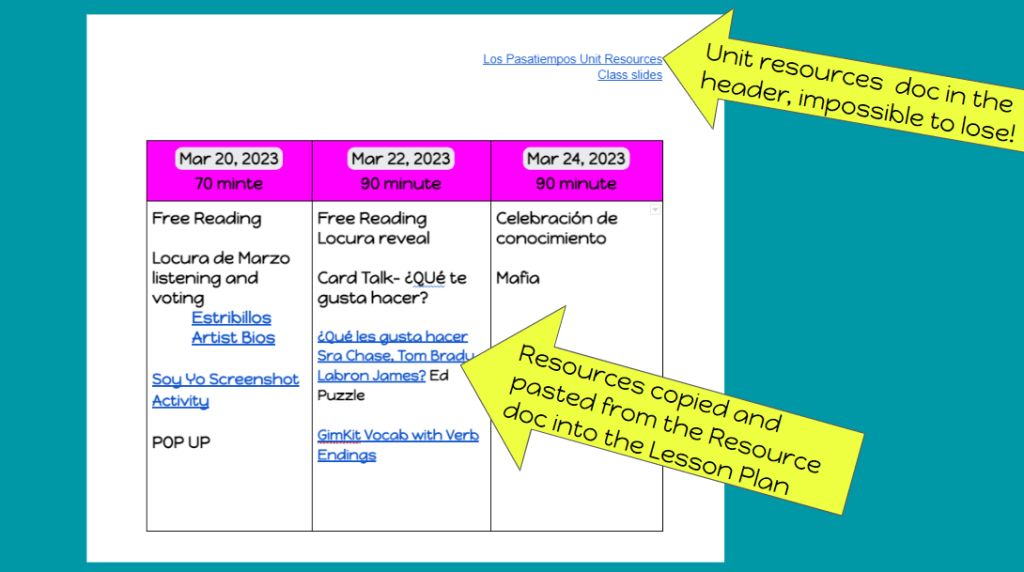
Again, please excuse the bare bones lesson planning… If you’re looking for beautiful lesson plans, find another blogcito!
Putting everything into one document is pretty time consuming, but I am hoping it will pay off next year when I’m not Google Drive Scavenger Hunting and pulling my hair out!
Well, that’s it, folks!
Hope your year wrapped up well, or you’re very nearly done! Take care, friends! While my 2022-2023 year was a great one, I can’t wait for summer and lots of adventures. Will I see you in St Petersburg for the Fluency Matters Conference in July?

 Señora Chase
Mil gracias for this post. So many things resonated for me, I feel prepared to reflect on the year and plan for the next. I really appreciate you taking the time. I appreciate you.
-Maureen
LikeLiked by 1 person
Thanks for sharing those ideas. I am taking the Cell Phone Probation sheet. I’ll make some adjustments for my students (to include earbuds and smartwatches). I used a similar strategy for absent students. I use a Google Slides for each class, that the students have access to through our platform. That includes WRite & Discuss, Bellwork and videos or slides. If they are absent, they should look at the material and become familiar with the vocab so that when they come back to school they are not totally lost. Needless to say hardly anyone looks at it, but it is my “back saver”, because I have proof that I provided them the opportunity to become aware of the content.
Be well!
LikeLiked by 1 person
Thanks so much…I am going to work on organizing my Google Drive better. Things are in folders by type, and sometimes under topics…like “Animals.” It’s not intuitive later.
Your lesson plan comments resonate with me! I carry around a little notebook to eight classrooms (not a lot for an elementary specialist, but still mind-blowing for this ex-MS/HS/Uni teacher) and each page has lesson plans for one group in order of the classes. A post-it lists the components of a daily lesson (opening song, greet, check-in, movement/song, lesson part 1, etc) that I move from page to page, and on the pages themselves, I list the date and the specifics from the current unit or theme. It’s pretty incoherent, and no methods person would ever use it as an example, but it works for me. Right after each class, I try to literally check off what we actually did and write a phrase that suggests what to do next and includes promises that I have made during the lesson (“We’ll do El Baile de la Fruta,” or “Arlo the squirrel will come to class tomorrow” or “Luna will be in charge of the numbers”) because otherwise, I forget.
PS Don’t tell your methods students, but I experimented with giving ChatGPT a text and asking it to write out a five-day lesson plan using the text in a beginning class, including essential questions, a hook, true-false questions, a table of multiple-choice questions, vocabulary completion fill-ins, assessments and rubrics for the assessments. It did. I wished I’d had it all those years that I wrote out my lesson plans. After the first day, they always changed anyway and I was re-writing.
LikeLiked by 1 person
That’s amazing!! I need to play with Chat GPT more!!
Like you, I do my best planning minutes after I finish the lesson, and I jot quick notes too, right after teaching.
LikeLike
Here’s an example from a demo today. I forgot to include the audience (young children) and level (novice mid), but it stayed relatively low. It took under two minutes to write, generate, and ask for additional tweaks. https://chat.openai.com/share/26d1ba27-7b60-41bd-a66b-8e57afd9702a
The story itself comes from Stories First: http://storiesfirst.org/greatstoryreadingproject
LikeLike
That’s soo cool, and I didn’t know you could share your Chat GPT like that, even cooler!!
LikeLike
Lesson plans and absent students, I feel ya! Since COVID I feel absenteeism is something that needs to be addressed. To combat the issues you discussed, I embedded my agenda slideshow onto my website. Anything that needed to completed because they missed was a direct link. Embedding it on my website also helped inform parents who could not see into Google Classroom. The slide show was also at the top of Google Classroom. But yeah, not many followed through. I did my job!
LikeLiked by 1 person
Amen!
LikeLike
Sra. Chase…it’s Margot. I just finished a year like the one you had last year. I feel like such a bad teacher. Reading your blog has made me feel like maybe I should not be so hard on myself and that I should be optimistic that next year will be better.
I need to spend more time reading this e-mail later on, in preparation for the school year, but so much of what you have said here makes so much sense.
Thank you so, so much for all the time you spend sharing marvelous activities and thoughtful ideas. I learn so much from you. And thank you for this blog post which I’m telling you has brought me to tears.
Can I do anything for you? Buy you a gift card/make a donation? Please let me know what you like. And thank you, thank you, thank you…for everything. I’m honored to follow you and learn from you. ~Margot
LikeLike
Oh Margot! Congratulations of finishing!! Awful years are the worst and I will be praying that next year will be much better for you!
You’re so sweet to offer…I added a “Buy Sra Chase a cup of tea” link to the bottom of the post, if you feel so inclined. It really delights me to know that this little corner of the internet has brought hope and encouragement. Hang in there, it’s just got to get better, right?!
LikeLike
[…] teacher Anne Marie Chase mentioned cell phone use and abuse in her latest blog post. Next year, she has plans to project a […]
LikeLike
Hey!
I saved this email to reread at the start of the year…and here I am two days again from the first day of school! Would you be willing to share the editable version of that cell phone/headphone/backpack slide? Its so aesthetically appealing and aligns 100% with what I tell my students!
Thanks for sharing!
Elizabeth
LikeLike
Sorry…my computer just went crazy! I don’t know if the reply I sent actually make it to you. Here’s an editable copy of my backpack slide, sorry it took so long!!! https://docs.google.com/presentation/d/1DW-28SZfC0RGLLDhod1GOyvfawel37PzEUl8BAKS3lY/copy?usp=sharing
Happy Back to School.
LikeLike